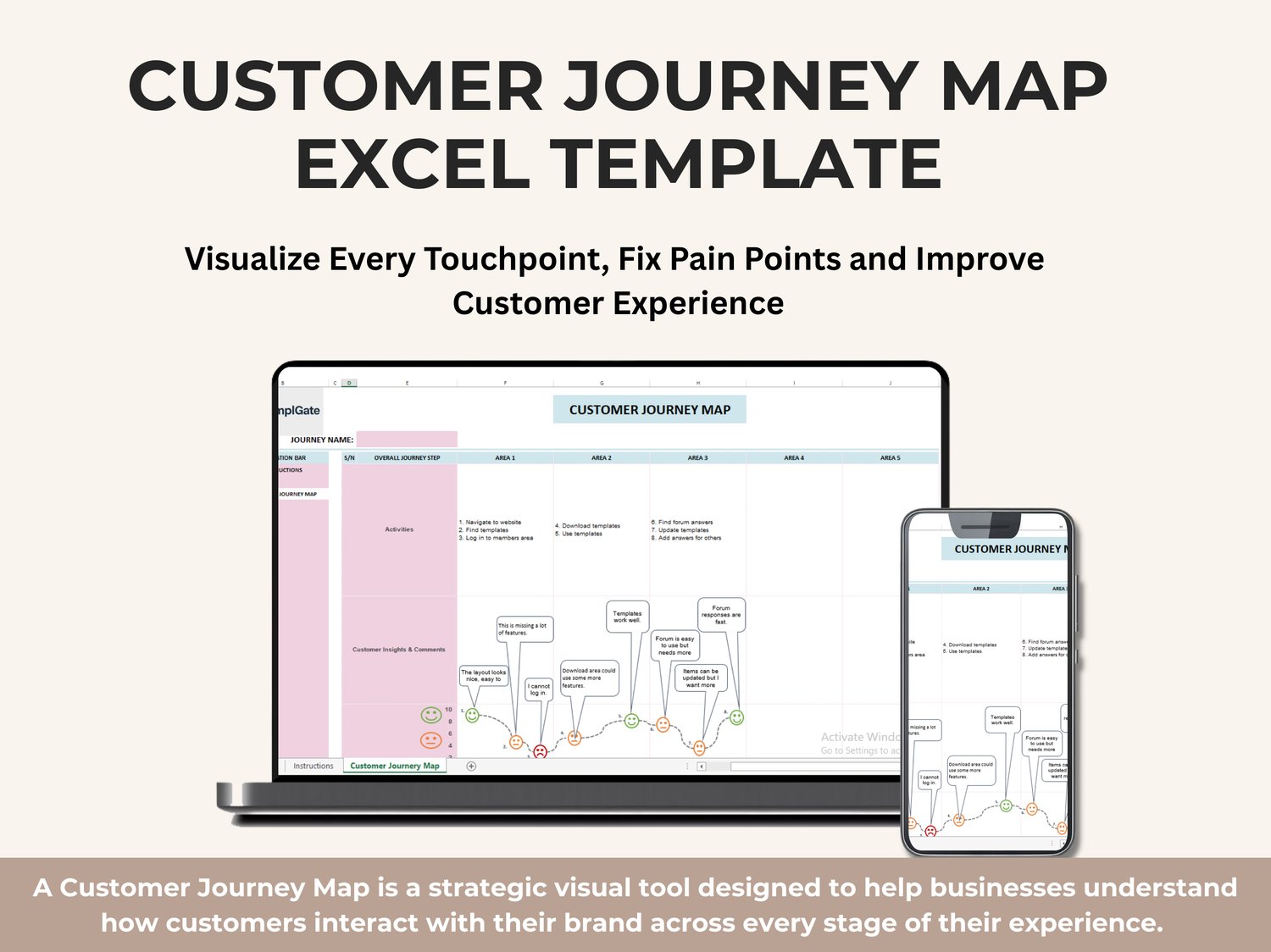
A Customer Journey Map is a strategic visual tool designed to help businesses understand how customers interact with their brand across every stage of their experience. This template provides a clear, organized, and professional layout that allows teams to document customer activities, emotions, challenges, and insights—from the very first interaction all the way to loyalty and advocacy.
By mapping the journey step-by-step, you can identify pain points, discover opportunities for improvement, and design a smoother, more satisfying customer experience.
What This Template Helps You Do
This Customer Journey Map Excel template gives you a complete framework to:
- Visualize the entire customer experience from start to end
- Break down each journey step into clear phases
- Document customer actions, thoughts, and emotions
- Identify what customers love and what frustrates them
- Capture insights and feedback directly within the workflow
- Reveal improvement opportunities that increase satisfaction and retention
- Align teams around a shared understanding of customer needs
Whether you're improving a product, enhancing a service, or optimizing user interactions, this template gives you a structured, professional way to understand your customers deeply.
Key Components Included in the Template
✔ Customer Persona
A semi-fictional character representing your ideal customer.
This helps anchor your journey map to real behaviors, motivations, and challenges—ensuring your analysis focuses on the right audience.
✔ Journey Stages
The template is organized into clearly defined journey stages (Awareness → Consideration → Purchase → Onboarding → Retention → Advocacy).
These stages help you break down customer experiences logically and capture insights at every point.
Common stages include:
- Awareness
- Consideration
- Purchase
- Onboarding
- Retention
- Advocacy
You can fully customize these to fit your business model.
✔ Customer Activities
Document exactly what customers do at each stage—such as browsing your website, signing up, downloading templates, contacting support, or engaging with community features.
This section helps you understand how customers behave and how each action leads to the next.
✔ Touchpoints
Capture where your customers interact with your brand.
Examples include:
- Website
- Email
- Social media
- Forums
- Customer support
- In-product interactions
Understanding touchpoints helps you improve consistency and reduce friction.
✔ Customer Insights & Comments
This section allows you to record direct customer feedback—positive or negative.
Examples from the screenshot include:
- “The layout looks nice and easy to use.”
- “I cannot log in.”
- “Templates work well.”
- “Forum is easy to use but needs more.”
- “Items can be updated but I want more.”
This real-world insight is essential for identifying opportunities.
✔ Customer Thoughts & Emotions (Visual Map)
A dedicated emotional experience curve is included, representing customer satisfaction at each step.
With color-coded emojis and visual markers, you can easily see:
- Where customers are happy
- Where frustration appears
- Where engagement could drop
- Which stages deliver the most value
This emotional journey helps teams prioritize what improvements matter most.
✔ Pain Points
Document key customer frustrations such as:
- Missing features
- Difficulty logging in
- Delayed updates
- Confusing interface
- Slow support response
Pain points highlight where the customer experience breaks.
✔ Opportunities for Improvement
Identify meaningful actions to enhance customer satisfaction, such as:
- Adding features
- Improving login experience
- Enhancing template library
- Increasing support responsiveness
- Offering better onboarding
This turns insights into actionable strategy.
✔ Metrics & KPIs
You can define performance indicators to measure journey success, such as:
- Conversion rates
- Time to complete tasks
- Customer satisfaction score
- Support response time
- Returning user rate
This helps you track progress over time.
Template Structure
The spreadsheet contains 1 main tab, accessible from the navigation panel:
📌 CUSTOMER JOURNEY MAP Tab
This tab includes:
- A customizable journey name
- A structured column layout for each customer journey area
- Activity mapping
- Customer insight and emotional journey visualization
- Touchpoints and feedback sections
- Space for opportunities and improvements
It provides a clean, professional, ready-to-use workspace for teams.
Who Should Use This Template?
✔ Project Managers
✔ CX/UX Designers
✔ Marketing Teams
✔ Product Managers
✔ Service Designers
✔ Startup Founders
✔ Customer Support Teams
✔ Business Analysts
Anyone who wants to understand customer experience more deeply will benefit from this structured tool.
Final Notes
This Customer Journey Map Template is designed to be:
- Easy to customize
- Simple to use
- Visually clear
- Perfect for workshops, reporting, or internal strategy sessions
It provides a full 360-degree view of your customer’s experience, helping you build better products, stronger relationships, and more confident business decisions.