The Earned Value Analysis (EVA) Template is a powerful project control tool designed to help project managers, PMOs, engineers, and consultants measure real project performance with precision.
Unlike simple budget or schedule trackers, this template integrates scope, cost, and schedule into one unified performance view, allowing you to instantly understand whether your project is on track, behind schedule, or over budget—and by how much.
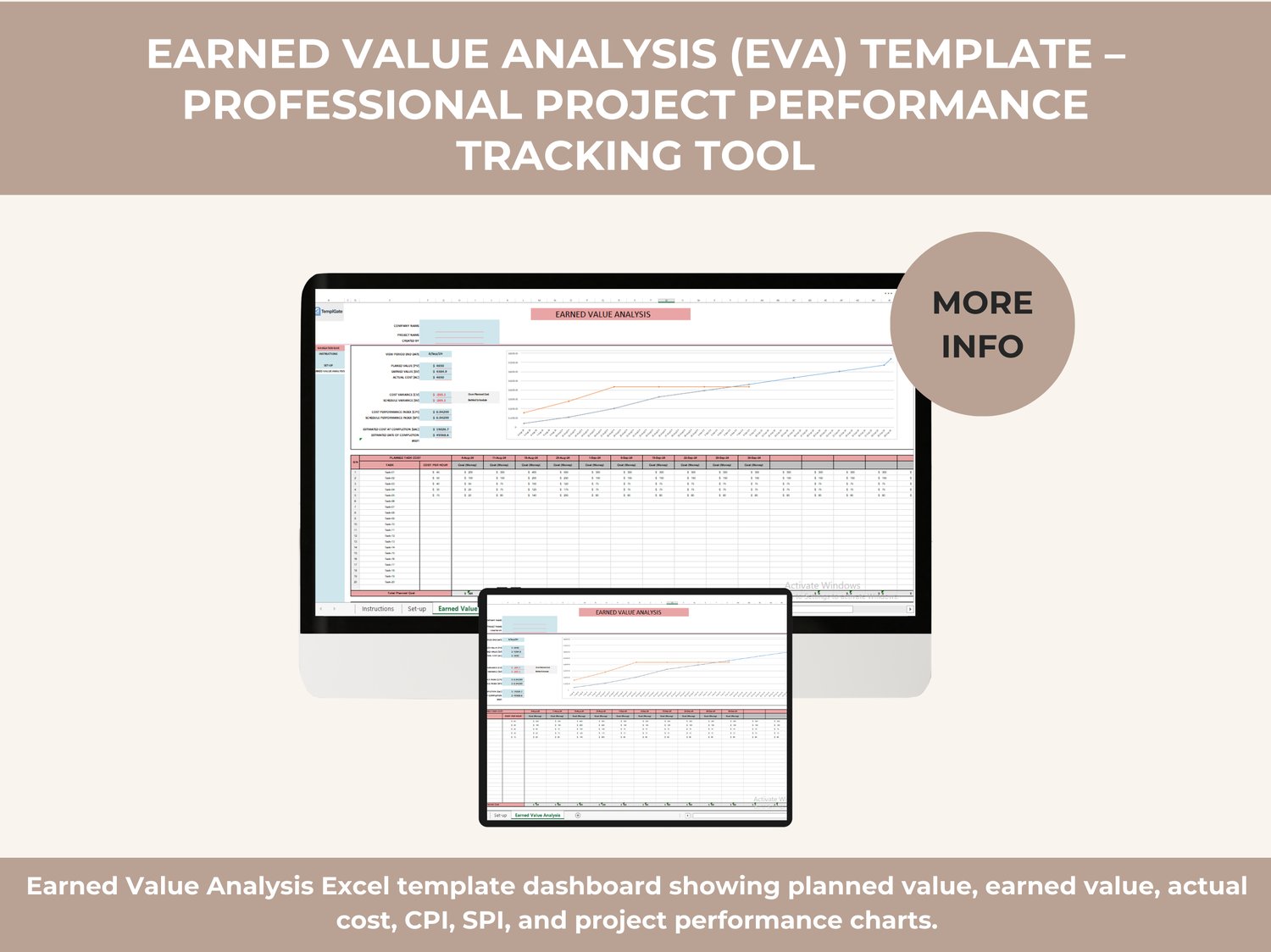
This spreadsheet automates all core Earned Value Management (EVM) calculations and presents them in a clean dashboard with charts, indicators, and performance indexes, so you can make data-driven decisions without complex formulas or external software.
What This Template Helps You Do
➡️ Track planned vs. actual progress objectively
➡️ Detect cost overruns and schedule delays early
➡️ Measure project efficiency using global PM standards
➡️ Forecast final project cost and completion outcomes
➡️ Communicate project health clearly to stakeholders
Whether you manage small initiatives or large multi-phase projects, this template gives you full visibility into project performance at any point in time.
Earned Value Analysis Explained (Built into the Template)
The template is structured around the internationally recognized Earned Value Analysis methodology, which compares:
✔️ Planned Value (PV)
The budgeted cost of work scheduled up to a specific date.
Example: If a $100,000 project is planned to be 50% complete, PV = $50,000.
✔️ Earned Value (EV)
The budgeted cost of the actual work completed.
Example: If only 40% of the work is finished, EV = $40,000.
✔️ Actual Cost (AC)
The real cost incurred for completed work.
Example: If 40% completion cost $45,000, AC = $45,000.
All values are calculated automatically based on your inputs.
Key Performance Metrics Automatically Calculated
The template instantly generates all critical EVA metrics:
✅ Cost Variance (CV = EV − AC)
Shows whether you are under or over budget.
✅ Schedule Variance (SV = EV − PV)
Shows whether you are ahead or behind schedule.
✅ Cost Performance Index (CPI = EV ÷ AC)
Measures cost efficiency.
✅ Schedule Performance Index (SPI = EV ÷ PV)
Measures schedule efficiency.
✅ Estimate at Completion (EAC)
Forecasts the total expected project cost at completion.
✅ Estimate to Complete (ETC)
Calculates the remaining cost required to finish the project.
✅ Variance at Completion (VAC)
Predicts the final budget overrun or underrun.
All indicators update dynamically as you enter data—no manual calculations required.
Visual Dashboard & Performance Charts
The template includes a built-in EVA dashboard that visually displays:
✔️ Planned Value vs Earned Value vs Actual Cost
✔️ Cost and schedule trends over time
✔️ Performance indicators (CPI & SPI)
✔️ Forecasted completion cost
This makes it easy to present project status in meetings, reports, or client updates.
Task-Level Cost & Progress Tracking
You can track project performance at a granular task level, including:
✔️ Task list with cost per hour
✔️ Planned cost per reporting period
✔️ Actual progress percentages
✔️ Time-based cost distribution
✔️ Automatic roll-up to project totals
This ensures accuracy from the lowest task level up to executive reporting.
Spreadsheet Structure
There is 1 main tab in this file, fully accessible from the bottom or side navigation:
➡️ Earned Value Analysis
This tab contains:
- Project details & setup area
- Planned, earned, and actual cost sections
- Automated EVA calculations
- Visual charts and KPIs
- Task-level cost and progress tables
The layout is intuitive and ready to use immediately.
Who Should Use This Template
✔️ Project Managers
✔️ PMO Teams
✔️ Construction & Engineering Managers
✔️ IT & Software Project Leads
✔️ Consultants & Analysts
✔️ PMP® & Earned Value practitioners
Perfect for real-world project control, audits, reporting, and professional certification environments.
File Compatibility & Usage
✔️ Works in Microsoft Excel
✔️ Easy to adapt for Google Sheets
✔️ No macros or add-ins required
✔️ Fully editable and reusable
✔️ Suitable for any industry
Why This Template Stands Out
✅ Professional EVA methodology
✅ Automatic calculations & forecasting
✅ Clean dashboard & charts
✅ No advanced Excel knowledge needed
✅ Saves hours of manual analysis
✅ Supports confident decision-making