Employee Timesheet & Database – Smart Time Tracking Made Simple.
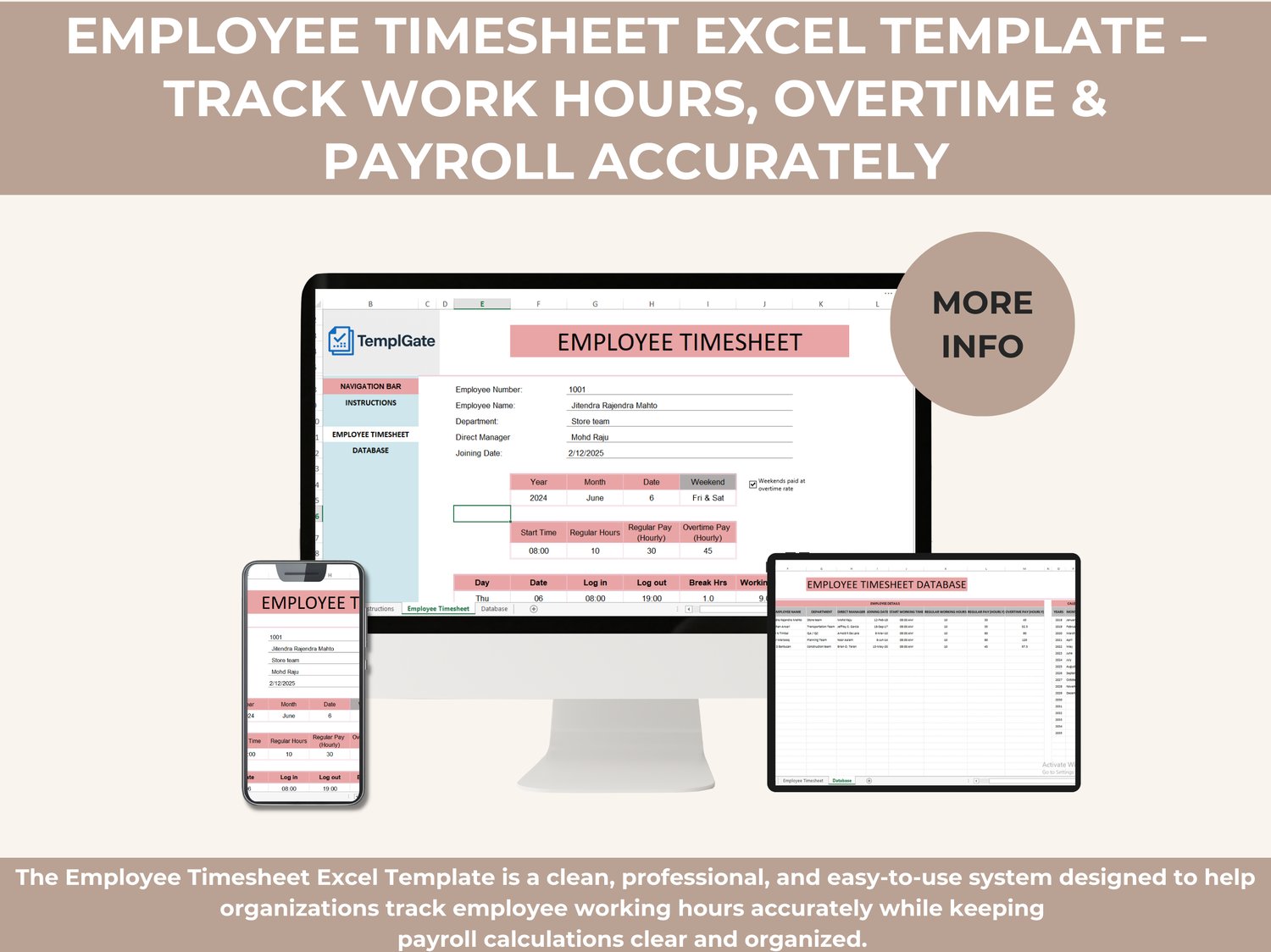
The Employee Timesheet Excel Template is a clean, professional, and easy-to-use system designed to help organizations track employee working hours accurately while keeping payroll calculations clear and organized. Whether you manage a small team or multiple departments, this template gives you full visibility into attendance, regular hours, overtime, and total pay — all in one structured workbook.
This template eliminates manual calculations, reduces payroll errors, and provides a reliable record of employee working time for daily, monthly, or yearly tracking.
Why This Employee Timesheet Template Is Valuable
Accurate time tracking is critical for fair payroll, productivity analysis, and compliance. This template helps you:
✔️ Record daily log-in and log-out times
✔️ Track regular hours, overtime hours, and breaks
✔️ Automatically calculate total working hours
✔️ Apply different pay rates for regular and overtime hours
✔️ Manage weekend work with overtime rules
✔️ Maintain a centralized employee database
✔️ Reduce errors caused by manual tracking
It’s ideal for HR teams, payroll officers, project managers, supervisors, and business owners who want a structured yet simple timesheet solution.
Template Structure – 2 Powerful Tabs
This Excel file includes two dedicated tabs, easily accessible from the side navigation bar or the bottom sheet tabs:
📄 EMPLOYEE TIMESHEET
This is the main working area where time is recorded and calculated. It allows you to:
✔️ Select employee details automatically from the database
✔️ Choose year, month, and working date
✔️ Define start time, regular working hours, and overtime rates
✔️ Log daily attendance (log-in, log-out, breaks)
✔️ Automatically calculate:
➡️ Working hours
➡️ Overtime hours
➡️ Total payable amount
✔️ Apply special rules for weekend overtime pay
The layout is clean, professional, and designed for daily use without complexity.
🗂️ DATABASE
The Database tab acts as the backbone of the system. It stores all essential employee and calendar data, including:
✔️ Employee ID and full name
✔️ Department and direct manager
✔️ Joining date and start working time
✔️ Regular working hours
✔️ Regular hourly pay and overtime hourly pay
✔️ Calendar setup (years, months, weekends, working days)
This centralized structure ensures consistency, accuracy, and fast employee selection inside the timesheet.
Who Should Use This Template
✔️ Small and medium businesses
✔️ HR and payroll departments
✔️ Construction, operations, and field teams
✔️ Retail and service businesses
✔️ Project-based organizations
✔️ Any team that tracks hours and overtime
Key Benefits at a Glance
✔️ Fully automated calculations
✔️ Easy to customize for any company
✔️ Clear payroll visibility
✔️ Professional layout suitable for reporting
✔️ No complex formulas required from the user
✔️ Works entirely inside Excel — no extra tools