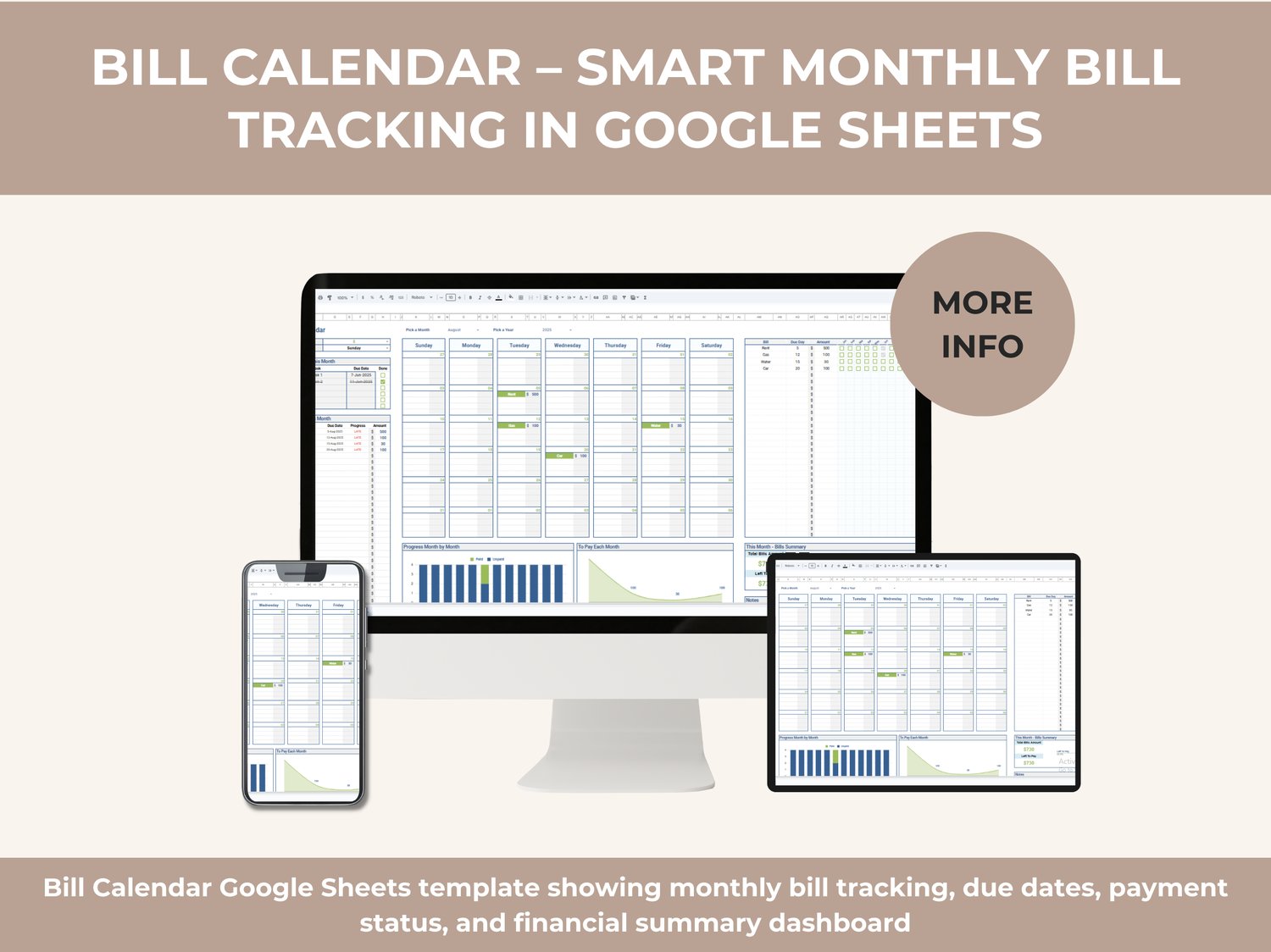
Managing bills shouldn’t feel stressful or chaotic. The Bill Calendar Google Sheets Template is a complete, visual, and automated system designed to help you track bills, due dates, payments, and monthly expenses — all in one clear dashboard.
This template combines a monthly calendar view, bill tracker, progress monitoring, and visual summaries so you always know what’s due, what’s paid, and what’s still outstanding — without using apps, subscriptions, or complicated tools.
Everything works 100% inside Google Sheets, updating instantly from any device.
What This Bill Calendar Helps You Do
➡️ See all your bills mapped clearly on a monthly calendar
➡️ Track due dates, amounts, and payment status at a glance
➡️ Avoid late payments and penalties
➡️ Monitor paid vs unpaid bills visually
➡️ Understand your monthly bill totals instantly
➡️ Stay organized with one simple, reliable system
Whether you’re managing personal bills, household expenses, rent, utilities, subscriptions, or recurring payments, this template gives you clarity and control.
Key Features
✅ Monthly Bill Calendar View
A clean, easy-to-read calendar that shows each bill on its exact due date. You can instantly see what’s coming up, what’s overdue, and what’s already paid.
✅ Bill List & Due Date Tracker
Add each bill with its due day, amount, and category. The template automatically organizes everything by month and due date.
✅ Payment Status Tracking
Mark bills as paid or unpaid using simple checkboxes. The system updates progress automatically without manual calculations.
✅ Bills for This Month Panel
A dedicated section that highlights all bills due this month, showing:
✔️ Bill name
✔️ Due date
✔️ Payment status
✔️ Amount
✔️ Late indicators
✅ Monthly Bills Summary
Instantly see:
✔️ Total bills amount
✔️ Total paid
✔️ Left to pay
✔️ Overall progress
No extra formulas or setup required.
✅ Visual Progress Charts
Automatic charts display:
✔️ Paid vs unpaid bills
✔️ Monthly payment progress
✔️ Trends across months
These visuals help you understand your finances faster than lists alone.
✅ Top Tasks This Month Section
Use this area to highlight urgent bills or financial priorities so nothing important gets missed.
✅ Custom Month & Year Selection
Easily switch between months and years using dropdowns. The entire dashboard updates automatically.
Fully Automated – No Manual Calculations
Once you enter your bills:
✔️ Totals calculate automatically
✔️ Status updates instantly
✔️ Charts refresh in real time
✔️ Monthly summaries adjust automatically
You focus on decisions — not spreadsheets.
Who This Template Is Perfect For
✔️ Individuals managing personal bills
✔️ Families tracking household expenses
✔️ Freelancers and remote workers
✔️ Renters and homeowners
✔️ Anyone who wants a clear, visual bill-tracking system
No accounting background required.
Built 100% for Google Sheets
✔️ Works entirely online
✔️ No Excel files
✔️ No downloads required
✔️ Accessible from desktop, tablet, or mobile
✔️ Easy to duplicate and reuse every month
Just open, enter your data, and start tracking.
Why This Bill Calendar Works Better Than Apps
Many apps are:
❌ Expensive
❌ Overcomplicated
❌ Locked behind subscriptions
This template gives you:
✔️ Full control
✔️ Lifetime usability
✔️ No recurring fees
✔️ Simple customization
You own the system — forever.
Start Managing Bills with Confidence
If you want a clear, reliable, and professional way to manage your bills each month, this Bill Calendar Google Sheets Template gives you everything you need in one simple dashboard.
Stay organized. Avoid late fees. See your finances clearly — every month.